Part 1 of 1
Player guide
Acting in Get Famous, with more to do between the big roles.
Actor Overhaul adds an Actor Dashboard to the phone. From there your Sim can take small acting roles, go to evening classes, make a headshot, resume and demo reel, find an agent, hire a manager or a publicist, and sign up for the Ward School of Arts Acting Department. Famous Sims also get a phone menu of celebrity events.
You do not need to join EA’s acting career to act. You can, and the agent can even help you into it. Most of this mod also works for a Sim with another job. Two things do not: a gig booked by your agent puts your Sim in EA’s actor career, and joining the Ward School quits your Sim’s current job.
Version 2.4.1 is free.
Requirements
- The Sims 4 with Get Famous. Required.
- XML Injector. Required.
- Maplebell Pie Menu. Required. It holds the MB Menu folder on the phone. You only need one copy for all mods that use it.
- Lumpinou’s Mood Pack. Required for the mod’s moodlets.
- Island Living is not needed. Older versions used it for the gig list. Since 2.4 the gigs have their own copies.
Install and update
What is in the download
Six packages. There are no script files.
| File | What it adds | Needed? |
|---|---|---|
maplebell_ActorOverhaul_Base.package |
The Actor Dashboard, Find a Manager, Find a Publicist, and all the text | Always. Nothing works without it. |
maplebell_ActorOverhaul_ActorActivities.package |
Headshot, resume and demo reel, the two studios, local acting classes, Submit to Auditions | Optional |
maplebell_ActorOverhaul_Agent.package |
The agent: finding, meeting, hiring and firing | Optional |
maplebell_ActorOverhaul_Gigs.package |
The acting roles in Browse Acting Roles | Optional |
maplebell_ActorOverhaul_ActingSchool.package |
The Ward School of Arts | Optional |
maplebell_ActorOverhaulCelebEvents.package |
Celebrity events | Optional |
Keep all six for the full mod. You can delete the parts you do not want, but always keep Base.
A few parts lean on each other:
- Find a Manager needs Gigs or ActingSchool, or there are no gigs for it to boost.
- The Ward School needs ActorActivities and Agent to reach graduation. Class 7 asks for a headshot, resume or demo reel, and those come from ActorActivities. Class 8 asks you to hire an agent, and that comes from Agent.
- With Base alone, the Sign Up and Prepare Headshot rows still show but do nothing, and Submit to Auditions and Find an Agent stay grey. Nothing breaks.
Installing
- Close the game.
- Remove every older Actor Overhaul file from your Mods folder.
- Extract the new ZIP (
maplebell_Actor_Overhaul_v2.4.1.zip) intoDocuments/Electronic Arts/The Sims 4/Mods. - Check that XML Injector, Maplebell Pie Menu and Lumpinou’s Mood Pack are installed.
- Delete
localthumbcache.packagefrom your Sims 4 user folder if it is there. - In Game Options > Other, make sure Enable Custom Content and Mods is on.
Updating to 2.4.1
Replace the old files: delete the six Actor Overhaul packages and put the new ones in their place. The file names are the same. Keep all six for the full mod. Never keep two copies.
In an older save:
- A caller who is already waiting for your Sim drops off the agent’s list.
- An agent you fired cannot be hired again.
- Agents already hired keep working.
How to use it in game
The Actor Dashboard
Open your Sim’s phone and choose MB Menu > Actor Dashboard. Your Sim needs Acting skill level 1 or higher to see it.
The dashboard has these rows:
- Browse Acting Roles
- Sign Up for the Ward School
- Take Local Acting Classes
- Prepare Headshot (headshot, resume and demo reel)
- Submit to Auditions and Casting Calls
- Find an Agent
- Find a Manager
- Find a Publicist
A row that is greyed out tells you why when you hover over it.
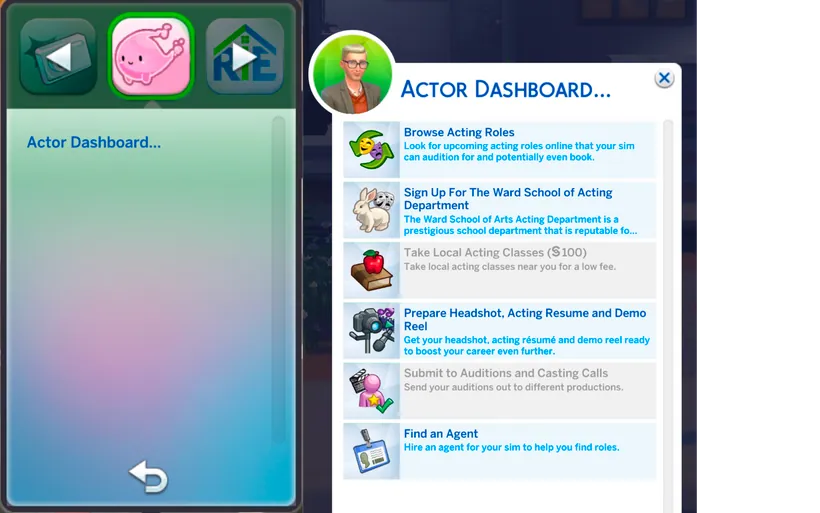
The Actor Dashboard on the phone. From an earlier version, before Find a Manager and Find a Publicist.
Take small acting roles (Browse Acting Roles)
Pick a role from the list. Some pay money. Some raise your fame and reputation, and some lower them. Each role tests one skill, usually Acting, Fitness, Comedy, Cooking or Writing. The tooltip tells you which skill and what level.
How it goes depends on your skill:
- Above the level the role asks for: Great Success.
- At the level: Success.
- A little below: Failure. You get a fifth of the pay.
- Far below: Critical Failure. No pay.
- A Sim in a bad mood can fail even with the right skill.
Failing a role never raises your reputation, and some failures lower it.
There are 34 roles here, from Singing Telegram and Stagehand Hustle to Voiceover Villain. More roles show up as your rating for these gigs goes up. Ward School students get nine extra student gigs too.
An hour before a role starts you get a reminder that your acting gig starts soon.
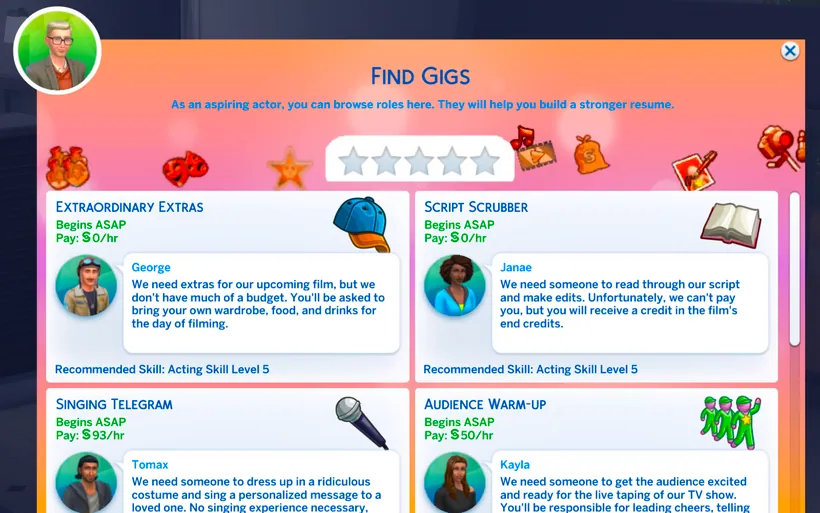
Picking an acting role. Each one shows its pay and the skill it needs.
Local acting classes
Evening classes for Sims who already have a job. §100 each. Monday to Friday, start between 5 PM and 11 PM. Your Sim is away for about two hours and comes back with more Acting skill.
Headshot, resume and demo reel
Choose Prepare Headshot and pick a studio:
- Bargain Shots: cheap, a small reputation boost. Every day, 8 AM to 8 PM.
- Elite Exposure Studio: expensive, a big reputation boost. Monday to Saturday, 9 AM to 6 PM. Closed Sundays.
You can buy each item separately or as a package. An item is greyed out while your Sim already has it.
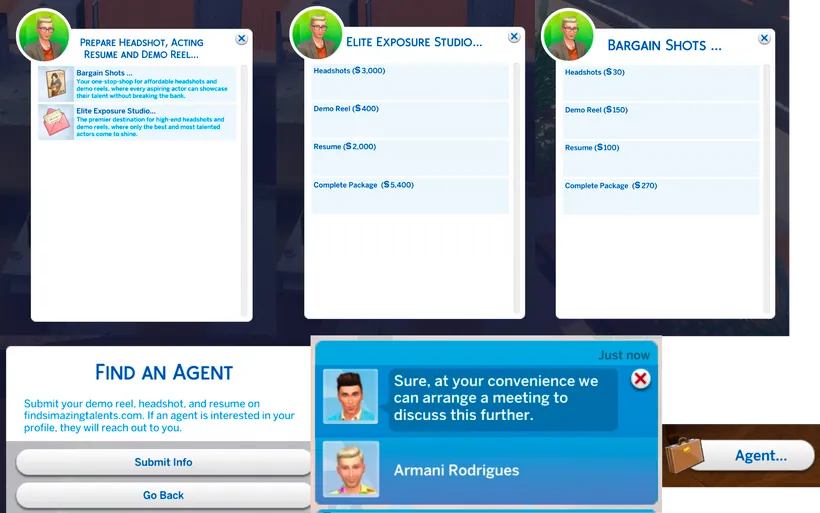
The two studios and their price lists, and the Find an Agent window.
Submit to Auditions and Casting Calls
Once your Sim has all three (headshot, resume and demo reel), Submit to Auditions and Casting Calls gives a reputation boost. It uses the three items up. To submit again, make new ones and wait seven Sim days.
Hire an agent
- Make a headshot, resume and demo reel. Find an Agent stays grey until you have all three.
- On the dashboard choose Find an Agent and submit your information. You get a confirmation, and Find an Agent is greyed while you wait.
- An agent calls within one Sim day, between 9 AM and 9 PM. Keep your phone on: a silenced phone declines the call.
- Not interested? Do not pick up. Interested? Press OK.
- You now have Schedule Meeting With Agent in the MB Menu on the phone, for seven Sim days. Use it, and the agent comes to wherever your Sim is. It does not have to be home.
- Talk to the agent. You can Ask About Experience, Ask About Possible Future and Ask For Commission.
- Choose Hire Agent to sign with them, or Reject Offer to turn them down.
If the agent is already on your lot when the call comes, Schedule Meeting stays grey. Just walk over and talk to them in person.
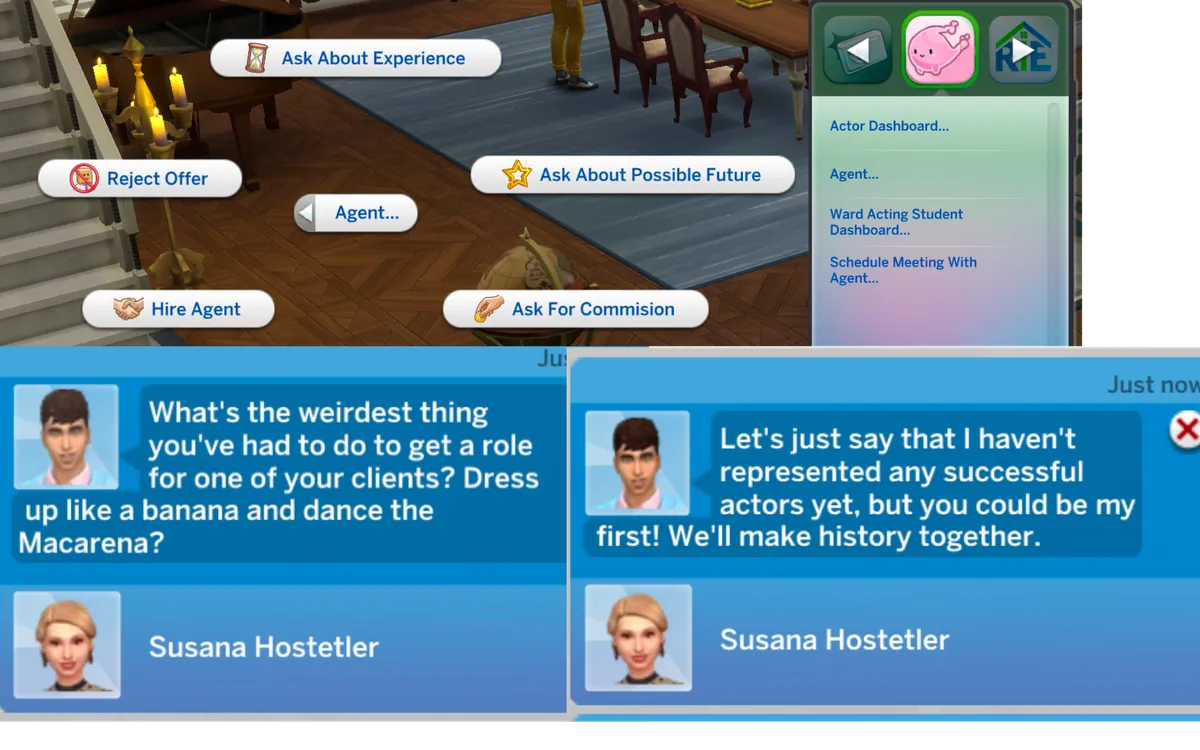
Meeting the agent, with Schedule Meeting With Agent on the phone.
You can only have one agent at a time. Agents are young adult or adult townies from outside your household. Butlers, Bonehilda, Temperance, Guidry and a few other special ghosts are never picked.
What your agent can do
Once hired, your phone gets an Agent menu:
- Ask for Advice
- Find Me a Gig
- Renegotiate the Contract
- Fire
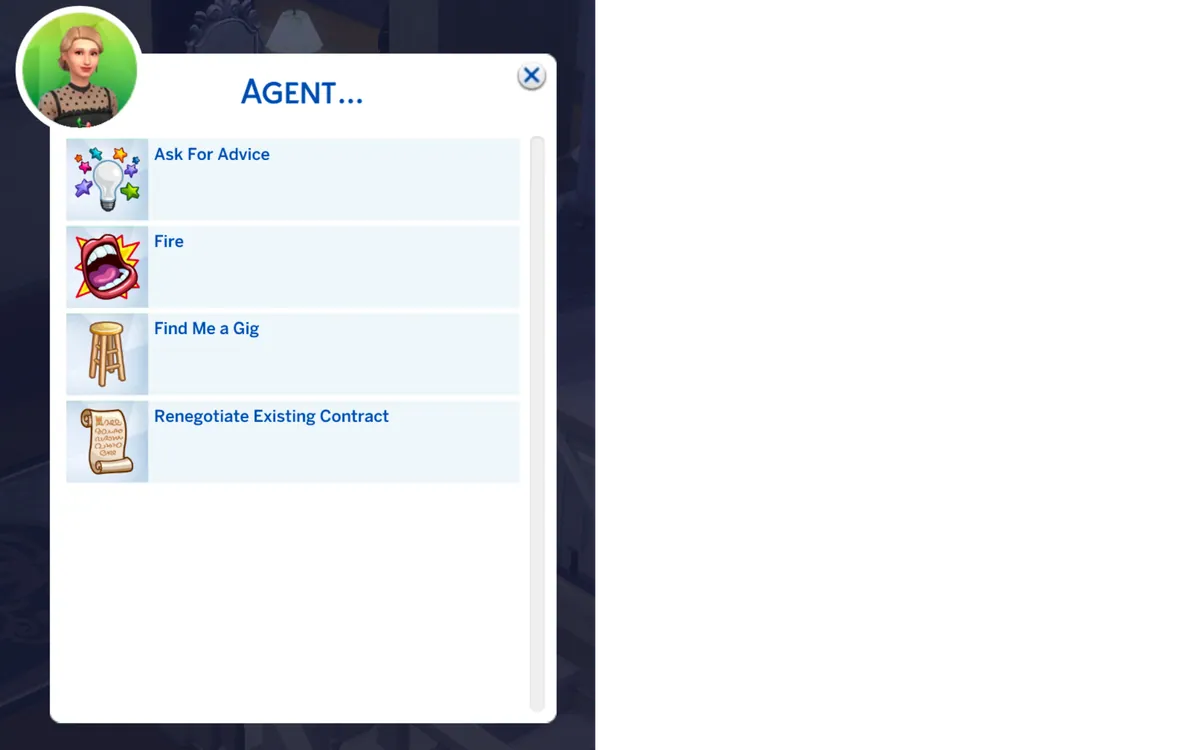
The Agent menu on the phone.
You also get social interactions with your agent, including What is the Scene Currently Like and Negotiate for Better Contracts. The relationship panel shows them as your Agent, and you as their Client.
Find Me a Gig sometimes finds your Sim a gig from EA’s Get Famous acting career, and sometimes finds nothing. Your chances go up with fame, Acting skill and reputation. A Sim with Acting 5 or lower does not get a gig this way.
- If your Sim is not in EA’s acting career, the game puts them in it. Joining it makes your Sim quit any other job, so keep that in mind before you ask for a gig. You still have to choose an agency for EA’s career. The two cannot be separated.
- Find Me a Gig is greyed while you already have a gig booked (“You already have a gig booked.”).
- It is not available to teens or to current Ward School students.
Renegotiating gets you a reply from the agent. Nothing else changes.
Fire or rehire an agent
You can fire your agent from the phone or in person. While Schedule Meeting is still open (seven days from the first call), you can meet the same agent again and hire them back. After that, start a new search.
Find a Manager
§500 from the dashboard. For seven Sim days your Sim has the Managed moodlet, and gigs from Browse Acting Roles and Ward School Find Gigs pay 25% more. It does not boost EA’s own acting career gigs. You can hire a manager again once the moodlet ends.
Find a Publicist
§750 from the dashboard. Choose a positive campaign (reputation up) or a negative one (reputation down). One campaign every three Sim days.
The Ward School of Arts
A school career for young adults and older. It has 8 classes, a term exam at each one, school productions, a paper on the history of acting, charity work and student gigs.
Joining
- On the Actor Dashboard choose Sign Up for the Ward School.
- Choose Get Info to read about the school, or Audition to call the recruiter.
- After you choose Audition, a message tells you the day and time the Ward Student Recruiter comes to your home lot.
- When the recruiter is there, use Start Auditions. This starts an audition event with goals. Earning any medal, bronze or better, gets you a decision letter.
- The letter depends on your Acting skill:
- Acting 9 or 10: a scholarship. Your Sim joins the school straight away.
- Acting 2 to 8: admitted. You have about 56 Sim days to pay the fee.
- Acting 1 or lower: not admitted.
- If you were admitted, go back to Sign Up and choose Finances to pay the §23,500 fee. You pay it once. Paying joins your Sim straight away. The Finances row tells you first that joining quits your Sim’s current job.
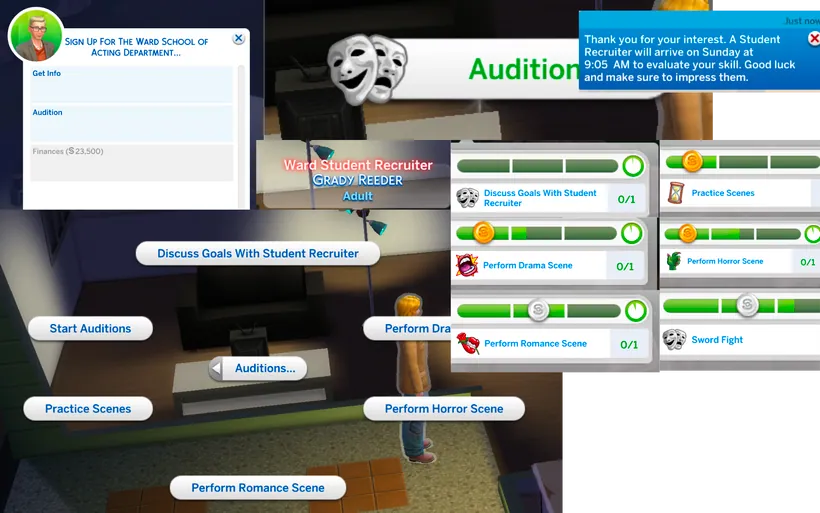
Signing up, and the audition with the Ward Student Recruiter.
Everyone starts at class 1, with the fee or a scholarship. Graduates cannot enrol again.
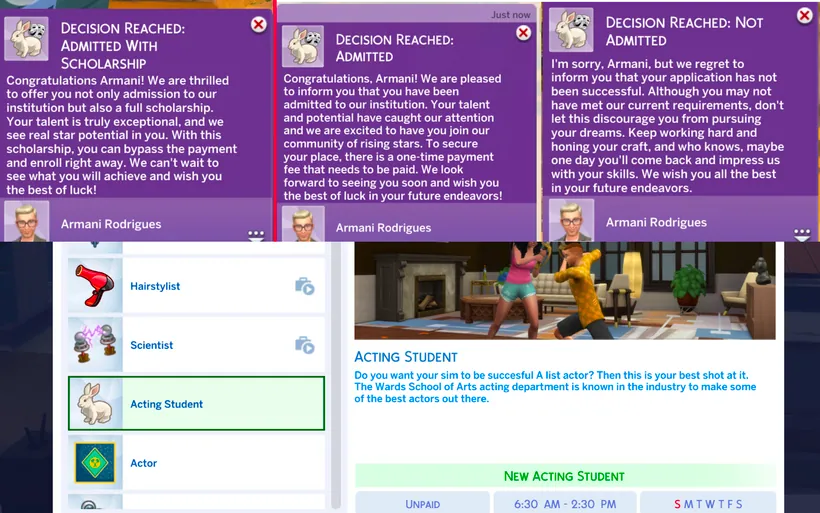
The three decision letters, and the Acting Student career.
The student menu
Once enrolled, your Sim has MB Menu > Ward Acting Student Dashboard on the phone. It shows only while they’re a Ward School student. From there:
- Go to Exam
- Term Exam Subject and Rehearse for the Exam
- Perform in School Production
- Plan and Produce a Production
- Find a Charity to Perform In
- Find Gigs
- View Grade
The paper is written on a computer.
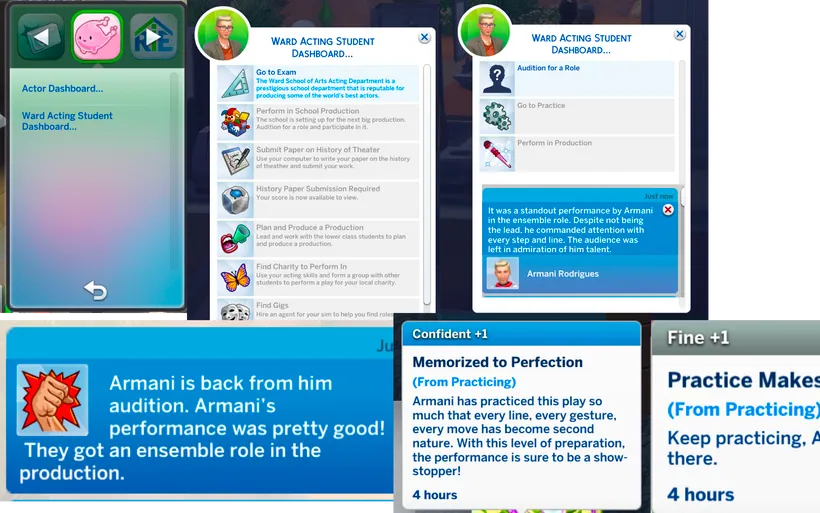
The Ward Acting Student Dashboard on the phone.
Classes
Each class has a checklist: an Acting level, practice hours, passing the term exam, and from class 2 one extra task.
| Class | Extra task |
|---|---|
| 1 | none |
| 2 | Perform in a school production |
| 3 | Write the paper |
| 4 | Plan and produce a production |
| 5 | Perform for a charity |
| 6 | Book a gig |
| 7 | Prepare a headshot, resume or demo reel |
| 8 | Hire an agent |
Class 7 needs the ActorActivities package and class 8 needs the Agent package, so graduating needs both.
Exams
- Go to Exam works on Fridays only. Your Sim must meet the exam’s requirements.
- First check Term Exam Subject. Then Rehearse for the Exam (two hours). Your Sim gets the Prepared for the Exam moodlet for seven Sim days. Taking the exam removes it. A prepared Sim can pass with one Acting level less.
The paper (History of Acting)
On a computer: write the paper, revise it, research online, then submit it. To submit, your Sim needs Acting 6 or Writing 5. The grade comes by phone about two Sim days later.
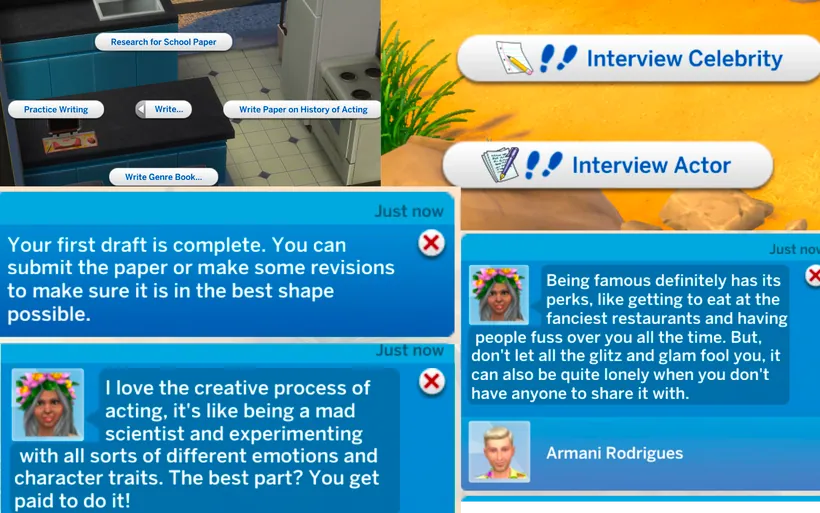
Working on the paper on the computer.
School productions
Perform in School Production: audition for a role, practise, then perform. Your Acting skill decides the role:
- Acting 6 or higher: lead
- Acting 3 to 5: ensemble
- Acting 2: supporting
- Acting 1: background
Plan and Produce a Production: your Sim runs the show.
- Select Theme first. Nothing else opens until you do. There are 17 themes, including Circus Spectacular, Fantasy Adventure and Superhero Saga.
- Hold the Audition Process, an event where you cast the roles.
- Organize Practice: choose weekday or weekend practice.
- Weekday: start Monday to Friday, 3 PM to 4 PM. Four hours.
- Weekend: start Saturday or Sunday, 10 AM to 11 AM. Eight hours.
- Optional: team activities to build relationships (see the table below).
- Set Date for the Play: Friday or Saturday.
- On that day, attend the play between 12 PM and 6 PM.
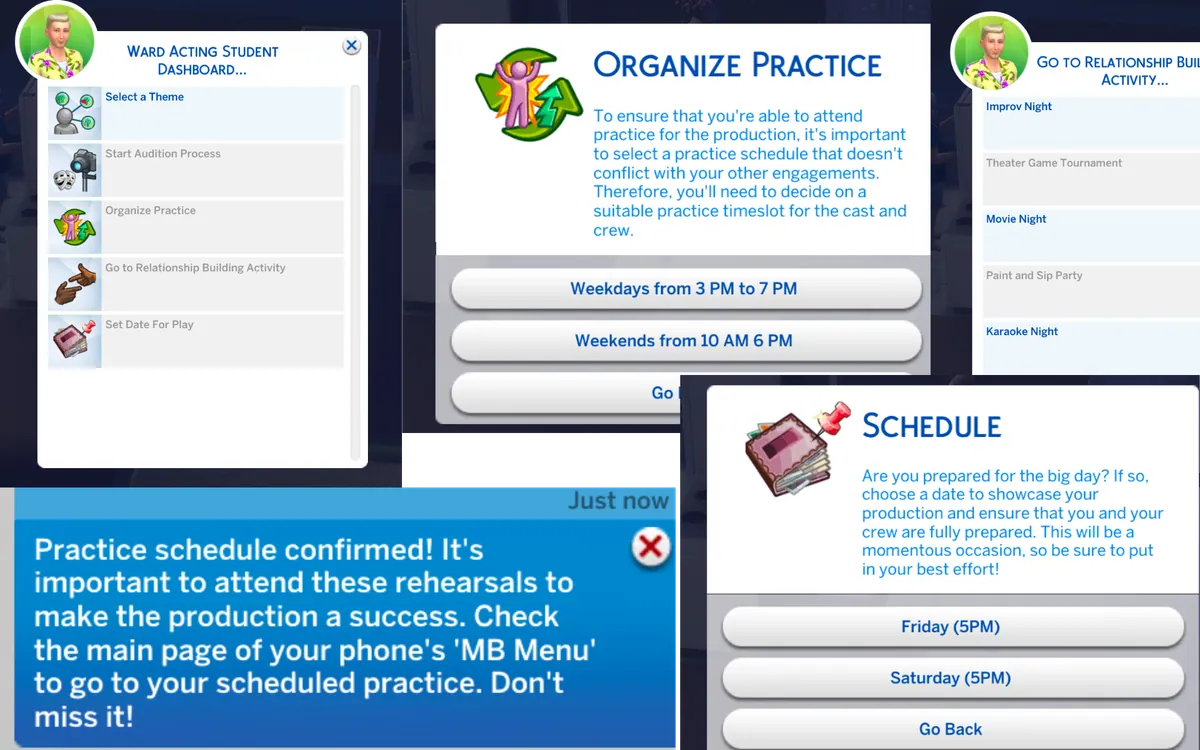
Planning a production, step by step.
Team activities and their start windows (every day):
| Activity | Start between |
|---|---|
| Costume Party | 9 AM and 5 PM |
| Escape Room Challenge | 9 AM and 5 PM |
| Group Dinner at a New Restaurant | 4 PM and 10 PM |
| Improv Night | 5 PM and 11 PM |
| Karaoke Night | 5 PM and 11 PM |
| Movie Night | 5 PM and 11 PM |
| Outdoor Adventure Day | 6 AM and 2 PM |
| Paint and Sip Party | 9 AM and 5 PM |
| Theater Game Tournament | 9 AM and 5 PM |
| Yoga/Meditation Class | 8 AM and 4 PM |
Charity performances
These open as you move through the school.
| Charity | When |
|---|---|
| Brighter Futures Fund | Monday, Tuesday, Wednesday, 12 PM to 3 PM |
| Caring Communities Coalition | Every day, 12 PM to 6 PM |
| Dreams Come True Charity | Every day, 8 AM to 4 PM |
| Giving Hearts Organization | Monday to Friday, 5 AM to 7 AM |
| Helping Hands Charity | Saturday, 6 AM to 4 PM |
| Hope for Tomorrow Foundation | Every day, 8 AM to 4 PM |
| The Empowerment Project | Sunday, Monday, Thursday, Friday, Saturday, 3 PM to 8 PM |
Student gigs
Find Gigs in the student menu opens at Acting Student class 6 (the school class, not Acting skill 6). It lists the nine student gigs and the regular roles.
Graduation
Passing the last exam ends the school career and gives a reputation reward. It happens once.
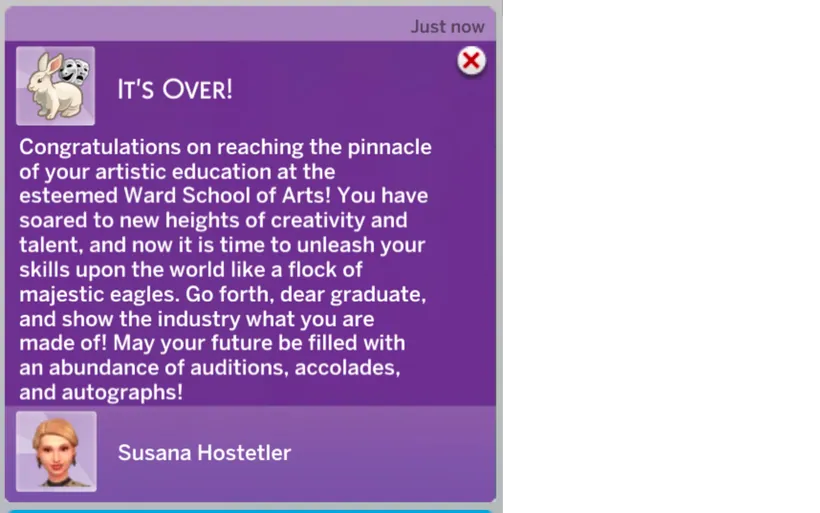
The graduation message.
Celebrity events
The Celeb Events menu on the phone needs the Acting skill and at least one fame star. Events are for teens and older. They are free.
Each event lasts about two hours (some longer). Partway through, a card gives your Sim a choice. Some choices change fame or reputation, and the others show a short message.
| Event | Day and start window | Fame stars |
|---|---|---|
| Celeb Fitness Retreat | Monday to Friday, 8 AM to 12 PM | 1 to 5 |
| Celeb-Owned Restaurant Dining Experience | Friday, Saturday, Sunday, 12 PM to 6 PM | 5 |
| Celebrity Book Club Meeting | Tuesday, 10 AM to 2 PM | 1 to 5 |
| Celebrity Chef Cooking Demo | Saturday and Sunday, 2 PM to 8 PM | 1 to 5 |
| Celebrity Golf Tournament | Saturday and Sunday, 9 AM to 3 PM | 4 to 5 |
| Celebrity Photoshoot | Wednesday, 2 PM to 6 PM | 1 to 5 |
| Celebrity Poker Tournament | Thursday, 8 PM to 11 PM | 5 |
| Charity Gala | Saturday, 9 PM to 1 AM | 1 to 5 |
| Exclusive Awards After-Party | Sunday, 11 PM to 3 AM | 3 to 5 |
| Fashion Show | Monday, 7 PM to 11 PM | 2 to 5 |
| Film Premiere | Friday, 6 PM to 10 PM | 1 to 5 |
| Luxury Yacht Party | Sunday, 5 PM to 9 PM | 4 to 5 |
| Music Awards Ceremony | Saturday, 7 PM to 11 PM | no extra check |
| Private Celebrity Party Invitation | Sunday, 7 PM to 11 PM | 4 to 5 |
| Private Movie Screening | Wednesday, 7 PM to 9 PM | 1 to 5 |
| Red Carpet Gala | Saturday, 8 PM to 12 AM | 4 to 5 |
| VIP Nightclub Party | Friday and Saturday, 10 PM to 3 AM | 3 to 5 |
| VIP Sports Game Box Seats | Saturday and Sunday, 12 PM to 6 PM | 5 |
For a window that crosses midnight, the day listed is the day it starts. These are start windows, not how long the event lasts. Each event’s row in the menu shows when it is available.
What’s new in 2.4.1 (12 November 2026)
Changes since the 31 October update.
Agents
- The agent’s call now also comes when the agent happens to be on your lot. Talk to them in person then.
- Butlers, Bonehilda, Temperance, Guidry and a few other special ghosts are no longer picked as agents.
- An agent who ages to Elder stays on the Schedule Meeting list.
- A caller stays on Schedule Meeting for 7 days only, and belongs to the Sim who got the call. Each new call gives a fresh 7 days.
- Find Me a Gig is greyed out with “You already have a gig booked.” while your Sim has an actor career gig booked.
- Five agent interactions now show “Listen to …” in the queue, like the others.
Gigs
- Find a Manager’s texts now say which gigs get the 25%: gigs from Browse Acting Roles and the Ward School.
- Theatrical Treasure Hunt and Background Dancer can now reach Great Success: each skill level adds 10 in 100 (Acting and Fitness). The picker names that skill.
- Good gig results no longer cost reputation, and failures no longer give fame (Background Dancer, Voiceover Artist Wanted, Method Acting Coach, Voiceover Virtuosos, Supporting Role Substitute).
- A great success or critical failure gives the client friendship change and its message line without Island Living.
- While on a Browse Acting Roles gig, the career panel shows “Actor” at “Backstage Acts” instead of the Ward School.
- The one-hour reminder says “acting gig” instead of “Odd Job”.
- Method Actor’s Assistant and Set Design Intern show the right result text for each result.
The Ward School
- Everyone joins at class 1, with the fee or a scholarship. Paying the fee joins straight away, and the Finances row says first that joining quits your Sim’s current job.
- Prepared for the Exam lasts 7 days, and the exam removes it.
- The makeup and costume interviews no longer count toward the history paper.
- The school audition role ends when your Sim graduates or leaves the school. No second audition while still at school.
- After Attend Play, the play day, the theme and the readiness are cleared, so the next play needs a new plan and new practice.
- Greyed rows now say why, for example “Only available in class 3.” or “Available from class 6.”
- The Audition’s stage-kiss scene no longer pairs a teen with an adult, or two relatives.
- Perform Romance, Drama and Horror Scene are no longer done by Sims on their own.
- The essay score messages no longer need Discover University for their sound, and the passed exam and admission messages now play one.
Celebrity events
- Greyed events say how many fame stars they need.
- 49 event choices that did nothing now show a short message. The Photoshoot’s “Seek Help” shows its result.
Text fixes
- Several pronouns, a missing quote mark and two grammar slips in gig and agent texts.
Good to know
- When your agent books you a gig, your Sim joins the game’s actor career. Joining it makes your Sim quit any other job, so keep that in mind before you ask for a gig.
- In an older save, a caller who is already waiting for your Sim drops off the agent’s list. An agent you fired cannot be hired again. Agents already hired keep working.
- Keep your phone’s sound on while you wait for the agent’s call. A silenced phone declines the call. If that happens, just submit your info again.
- Graduating from the Ward School needs the ActorActivities and Agent packages: class 7 asks for a headshot, resume or demo reel, and class 8 asks you to hire an agent.
Known limits
- Silenced phone. With the phone on Silent, the agent’s call is declined straight away. You can submit your information again.
- Agent already on your lot. Schedule Meeting is greyed with no reason given. Talk to the agent in person instead.
- Mod gigs and EA gigs can overlap. A role from Browse Acting Roles and a gig in EA’s acting career can be booked for the same time.
- One school audition per stay at the school. The production role your Sim gets is kept until they graduate or leave the school. Until then, “Audition for a Role” stays grey (“You have already been assigned a role.”) even after Acting goes up. You can still perform again in that role.
- Seek Help. In the Celebrity Photoshoot, Seek Help plays the success sound even though it goes wrong.
- English text. All 18 game languages show the English text for now.
- Rare game error when firing by phone. Very rarely, firing your agent from the phone can show a game error. It happens in the game’s own code, when a save still has a relationship with a Sim who was deleted. The game’s own interactions do the same, and the mod can’t fix it.
Troubleshooting and FAQ
I cannot see the Actor Dashboard. Your Sim needs Acting skill level 1. Check that Base is installed, that XML Injector is installed, and that custom content is on in Game Options.
A dashboard row is greyed out. Hover over it. The tooltip tells you why: the wrong day or time, a missing item, an agent you already have, or a waiting period.
Find an Agent stays grey. You need a headshot, resume and demo reel first. It is also grey while you wait for a reply, and while you already have an agent.
The agent never called. The call comes within one Sim day, between 9 AM and 9 PM. Check your phone is not on Silent. If a day has passed, submit your information again.
I cannot find Schedule Meeting With Agent. It is in the MB Menu on the phone, and only after you pressed OK on the agent’s call. It lasts seven Sim days. It disappears once you hire an agent. If the agent is on your lot, talk to them in person.
Find Me a Gig never finds anything. Your Sim needs Acting 6 or more for any chance. Fame, more Acting skill and a better reputation raise the odds. It is grey if a gig is already booked, for teens, and for Ward School students.
My Sim joined EA’s acting career by itself. That is Find Me a Gig. Its gigs come from EA’s career, so the game puts your Sim in it. Choose an agency in EA’s career as usual.
The recruiter came but I got no letter. You need at least a bronze medal in the audition event.
Go to Exam is grey. Exams are on Fridays only, and your Sim must meet the class requirements.
My Sim cannot graduate. Check that ActorActivities and Agent are installed. Class 7 needs a headshot, resume or demo reel, and class 8 asks you to hire an agent.
The Plan and Produce steps are grey. Select a theme first.
Celeb Events is missing. Your Sim needs the Acting skill and at least one fame star, and CelebEvents must be installed. Each event also has its own day, time and fame range.
Do I need Island Living? No. Not since 2.4.
Can I delete parts I do not want? Yes. Keep Base. Remember the Ward School needs ActorActivities and Agent to graduate, and Find a Manager needs Gigs or ActingSchool.
Text shows in English in my language. That is expected for now. Every language shows English text.
If something else goes wrong, tell me what happened, what you expected, and which parts of the mod you have installed.